
Zeit
Time Travel Tourism
ROLE
Research
Branding
UI Design
UX Design
Testing
CLIENT
School Project
DURATION
3 months
TOOLS
Figma
Illustrator
Project Background
Zeit, the latest subsidiary of the Virgin empire, is bringing users a total of 289 unique destinations to plan a vacation at any point in time all over the world. The company is looking to create an e-commerce site users can purchase tickets along with a new brand identity.

Research
During the research phase, I used both competitor analysis and user interviews to collect pain points and successes of travel-based paths. I learned that participants wanted to know high-level details of the traveling method so they could ensure their safety to and from the destination along with having pricing options with information of the elements included so they could choose what suites them best.
Challenge
-
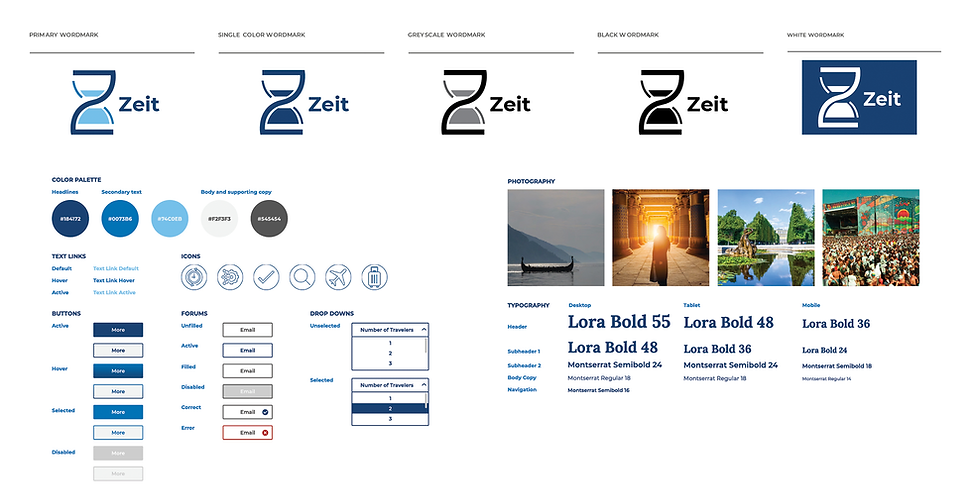
Design a logo for the company that can be modern and historical at the same time.
-
Design a responsive eCommerce website that is easy to use and that allows customers to browse through all different trip categories and details, filtering via interests and classifications you create.
Research Plan
PROBLEM
This is the first-time travel experience for users. We need to analyze and research findings to give users peace of mind and ease of booking their travel.
RESEARCH GOAL
Identify users’ motivations and fears behind using time travel for vacations.
RESEARCH OBJECTIVES
-
Identify the demographic of users
-
Identify the current motivations, frustrations, and goals using current-day travel sites.
-
Identify the hesitations or excitements of user time travel
-
Evaluate and analyze the current trends in travel and the competitive landscape
Summary of Findings
USER INTERVIEWS
Frustrations
-
Participants felt that any travel deals offered were not during ideal/practical travel times.
-
Participants didn’t enjoy traveling during peak seasons/busy times. Limited options due to selling out.
-
Participants felt overwhelmed by online options through multiple sites.
-
Participants like having a human to contact if issues arise.
Motivations
-
Participants prefer leisure travel over business.
-
Participants would prefer to travel with friends or family groups.
-
Participants would rather travel in comfort over speed if it was more cost-effective.
-
Participants like to site-see and explore in relaxing environments.
-
Participants would like to see and experience events in person.
-
Participants like pre-planned packages with options to adjust flights or hotels.
COMPETITIVE ANALYSIS
-
Most travel sites label and display the location options nicely with simple imagery.
-
Having grouping for locations by trending or theme is helpful for users who want to get away but don't know where.
-
Most offer all getaway necessities like booking hotel, flight, car, train. Additional things to do are also helpful.
-
Preview images or videos of the experience draw and build excitement.
-
Clearly identified purchasing/booking options.
-
Detailed filter options for pricing and amenities.

Persona

Sitemap


Ideate
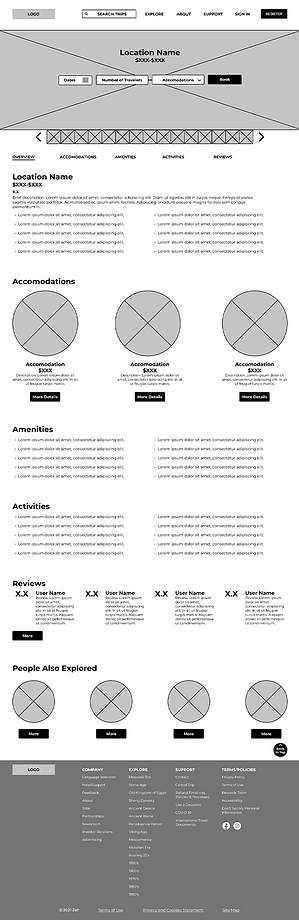
I wanted to create an iconic logo to help the company build familiarity amongst its users. For the wireframes, I focused on the landing page to organize the company information and give users a sense of security as well as excitement for possible trips. The search page and product page are also important in helping a user pick a trip and continue with checkout.
Wireframes
LANDING PAGE

SEARCH PAGE

PRODUCT PAGE
Logo & UI Kit

Testing
For testing, I created High Fidelity Prototypes so usability testing would have more accurate feedback based on visual and functional design. After the first test of the prototype, I learned users still need more detail on the product packages and what went into the pricing.
Prototype
Usability Test
TEST OBJECTIVE
-
Test the overall design of the product to ensure user ease and clarity.
-
Test to see how users search for their trip.
-
Test if the product provides resources to gain trust and information so the user can book a trip with peace of mind.
-
Observe areas of confusion, difficulty, etc.
METHODOLOGY
Remote: The user will share a screen over a virtual meeting while walking through the Prototype.
PARTICIPANTS
-
Number of Participants: 4-10
-
Age Demographic: 30-60
-
Characteristics: Adventurer, Family Oriented, Creative.
TESTING GOALS
Observe the interactions the user had with the Zeit website. Identify any frustrations or confusions through the tasks given. Identify the successes of the design and usability.
Affinity Map


Next Steps
Revise the prototype based on high-importance elements from the initial usability test. Then I can conduct additional user tests to ensure the pain points were solved and that others weren't created. I can continue rolling out the additional pages and finalize features for the site.
