
Petx
Pet Health Diagnosis
ROLE
Research
Branding Exploration
UI Design
UX Design
Testing
CLIENT
School Project
DURATION
1 month
TOOLS
Figma
Illustrator
Photoshop
Project Background
PETx is an app that pet owners can download to their mobile phones and enter their pet symptoms to get a general suggested diagnosis and tips on how to help their pet. It is meant to help rule out major issues or help owners know when it’s time to go to a medical expert.
The goal of this project is to create an MVP for the app. A symptom checker that pet owners can use to guide them in better caring for their pets.
-
Design key visuals to guide users through the symptom checker
-
Guide users through alternative solutions and articles that can help them and
their pets -
Conduct user testing to ensure the product is helpful and relative in the user market

Research
Based on both competitor analysis and user interviews I was able to identify that most products didn't offer all of the information pet owners would need in one location and that pet owners would be open to paying for a subscription if the support was 24/7 and they had a clear idea of who was online to support them.
Research Plan
PROBLEM
Help pet owners access professional assistance and research their pet's health and behavior on one platform.
RESEARCH GOAL
Identify users’ motivations and pains in getting pet diagnostics and learning more about their pet's general health.
RESEARCH OBJECTIVES
-
Get benchmark analysis of the strengths and weaknesses of competitor products.
-
Identify the current motivations, frustrations, and goals pet owners have with their pet's health.
-
Identify the habits users have when searching for their pet’s behaviors and interactions with their vet.
Summary of Findings
USER INTERVIEWS
Frustrations
-
Paying money for simple or minimal issues that could be solved independently
-
Getting different solutions from professionals without a clear answer to the problem
-
Multiple resources for tracking and learning
Motivations
-
Easy access to helping their pet
-
Learning about the diagnosis, not just having someone else fix it
-
Visuals along with informative text to help learn and be accurate
COMPETITIVE ANALYSIS
-
Most products require a subscription or payment to access professional help.
-
Need to create a profile to use the product.
-
Access to a vet or professional can take time and is unclear how long the wait time or availability is.
-
Symptom checkers aren't universally user-friendly and don't offer multiple options.

Define
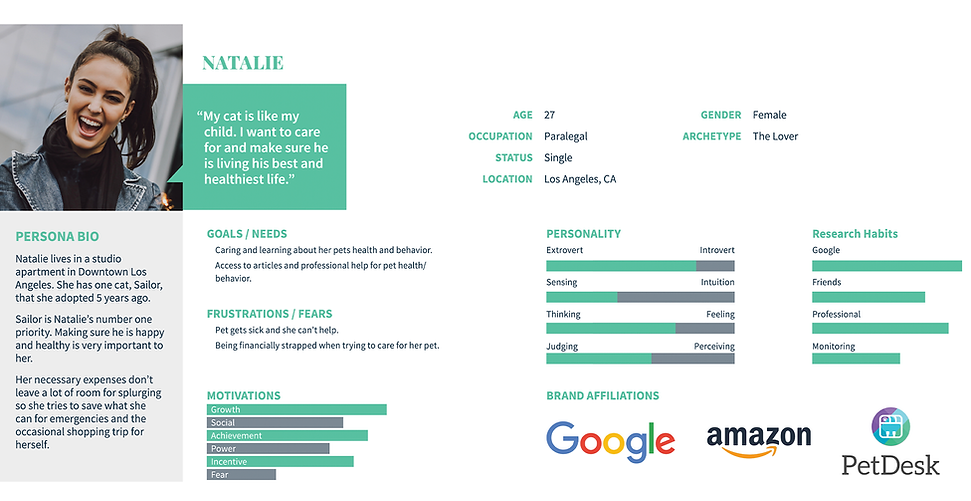
To help build out the product I created goals from both the business and user perspectives as well as a persona to help build how users will use the product. Mapping elements were also created in this stage to help build and identify the different elements and features needed for the app. Based on research I learned what steps users would need to take for the symptom checker and other resources users would need in the app.
Persona
Sitemap


Ideate
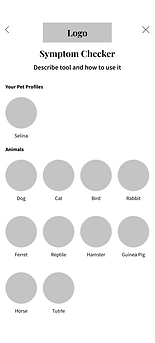
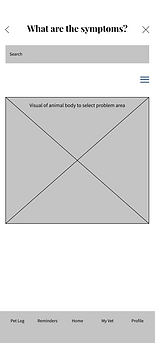
Once a general idea of the necessary elements was created I moved forward with wireframes and branding. Along with creating a logo for the product, it was key to create the supporting elements that would be used to build the prototype like icons and how buttons and other interactive elements would be used.
Wireframes
LANDING SCREEN

CONDITIONS

CHOOSE ANIMAL
OVERVIEW

AREA ISSUE
VETS

SYMPTOMS

Logo & UI Kit


Testing
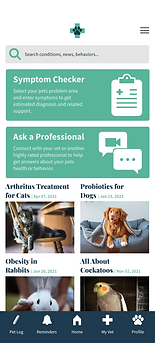
For testing, I created High Fidelity Prototypes so usability testing would have more accurate feedback based on visual and functional design. Using the feedback from the usability test I was able to create a priority matrix to prioritize the following round of iterations. Overall testing was a success and any edits to the prototype were very minor in functionality and more with clarity in visual design.
Prototype
LANDING SCREEN
CONDITIONS

CHOOSE ANIMAL

OVERVIEW

AREA ISSUE
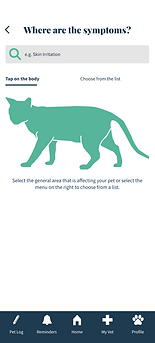
VETS

SYMPTOMS
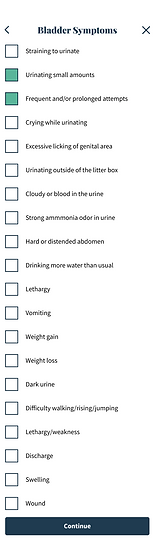
Usability Test
TEST OBJECTIVE
-
Test how users use the symptom checker
-
Test overall visuals
-
Test how users feel about subscription-based elements
METHODOLOGY
Remote: The user will share a screen over a virtual meeting while walking through the Prototype.
PARTICIPANTS
-
Number of participants: 3-5
-
Age Demographic: 25-60
-
Characteristics: Has pets. Open to researching and learning about pets' health.
TESTING GOALS
Observe the interactions the user had with the Symptom Checker on the Petx app. Identify any frustrations or confusions through the tasks given. Identify the successes of the design and usability.
Priority Matrix


